Mon - Sat: 9:00 AM - 6:00 PM
Workplace Wellness

Ergonomics 101: Saving Your Back

Practical adjustments, lumbar spine physics, and everyday habits to stop workday fatigue before it starts.

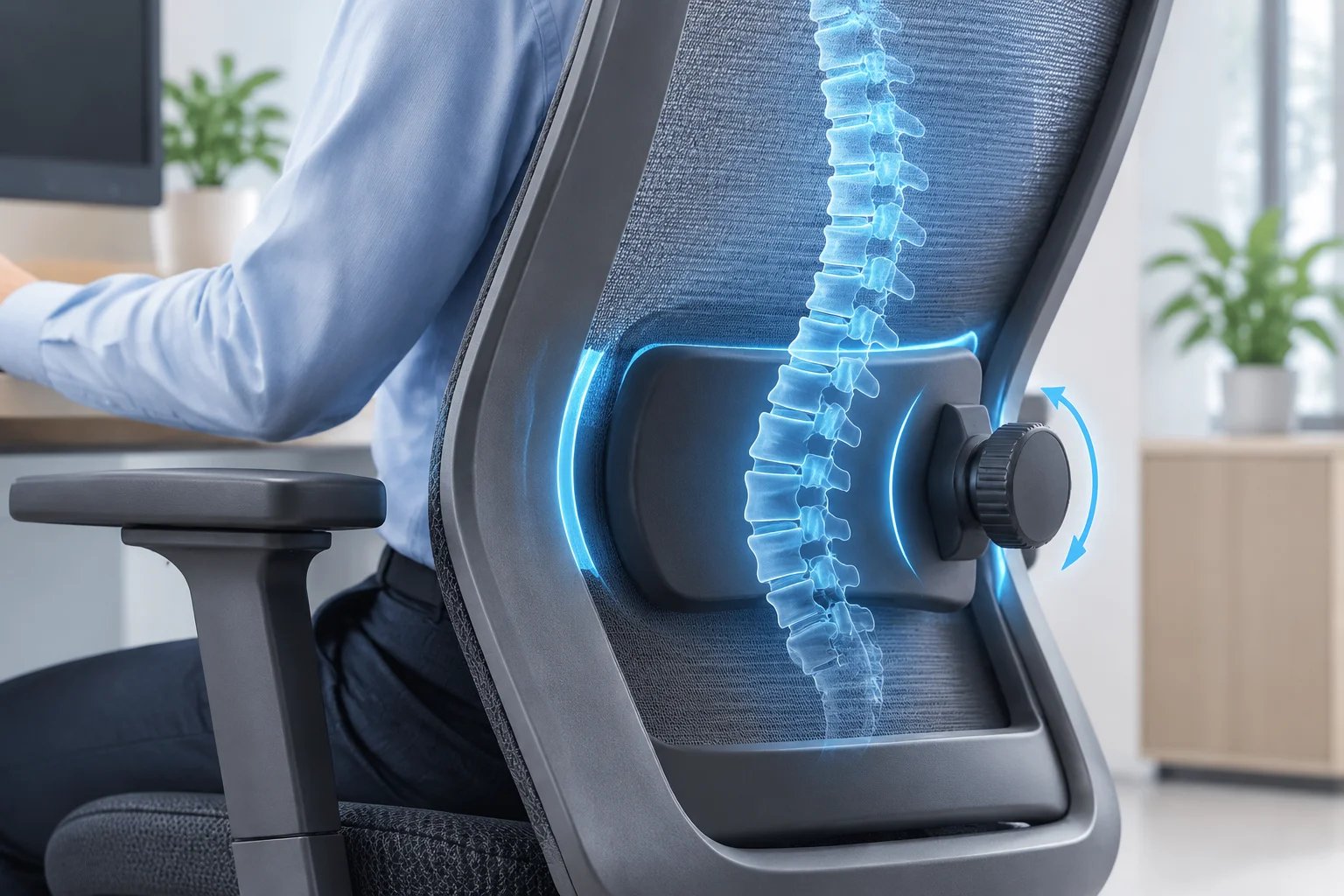
A close-up of a chair's lumbar support feature with graphics showing spinal alignment.
Posture Fundamentals

Why Your Spine Struggles with Static Sitting

Sitting still for eight or nine hours each day places tremendous cumulative pressure on your lumbar discs, leading to gradual muscular fatigue and chronic soreness.

The human spine naturally forms an S-shaped curve, designed to absorb walking shock and balance body weight. Once you slump forward toward a laptop or relax into an unsupported foam cushion, that natural lordotic curve flattens out. Discs compress unevenly, and back muscles work overtime to keep your torso upright.

True ergonomics is not about staying rigidly frozen at ninety degrees; it revolves around dynamic support and neutral joint alignment. By fine-tuning lumbar depth, seat pan inclination, and armrest elevation, you relieve mechanical stress across the lower vertebrae.

Clinical Insights

Key Metrics in Modern Ergonomics

100–110°
Optimal Recline Angle for Disc Pressure Relief
90°–100°
Target Elbow & Knee Bend for Circulation
2 Inches
Clearance Between Knee Crease and Seat Edge
45 Mins
Maximum Seated Interval Before Microbreaks

Upgrade to Spine-Certified Seating

Explore our collection of high-performance task chairs with multi-axial lumbar control.

Step-by-Step Seat Adjustments for Immediate Relief

Most people sit in an office chair straight out of the box without tuning its mechanical controls. Taking five minutes to personalize tension and height settings makes an immense difference in spinal decompression throughout your workday.

Begin by lowering or raising your pneumatic cylinder so your feet rest completely flat on the floor or an angled footrest. Your thighs should remain parallel to the ground, distributing body weight evenly across the entire seat cushion rather than concentrating it solely on the tailbone.

  • Align Lumbar Height: Position the curved lumbar bolster right against the small of your lower back, exactly where the inward curve begins above the pelvis.
  • Adjust Seat Depth: Leave a two-finger to three-finger gap between the back of your knees and the waterfall front edge of the seat pan to preserve vascular flow.
  • Position Armrests: Level the arm pads so your shoulders stay relaxed and neutral without hunching upward or sloping downward while typing.

Once these contact points are synchronized, unlock the tilt mechanism to encourage subtle recline motion. Engaging the chair's recline tension reduces intradiscal pressure by up to 30 percent compared to rigid upright perching.

Ergonomics is not a luxury accessory; it is preventative health care for the structure that carries you through life.

— David Smith, Ergonomics & Seating Specialist

Beyond the Chair: Daily Micro-Habits for Long-Term Spine Health

Even the most advanced mesh task chair cannot fully offset hours of absolute stillness. Incorporating thirty-second postural resets every forty-five minutes stimulates blood circulation, lubricates spinal joints, and prevents upper cervical muscle guarding.

Elevate your monitor so the top third of the screen meets your eye line when gazing forward. This simple adjustment stops your chin from poking forward, taking significant strain off your upper trapezius and thoracic vertebrae.

Essential Ergonomic Rules

  • Maintain the Lumbar Curve: Never let your lower spine collapse into a slouched C-shape during focused typing tasks.
  • Keep Feet Grounded: Firm contact with the floor stabilizes the pelvis and relieves excessive hamstring tension.
  • Unlock Dynamic Tilt: Set your recline tension to move smoothly with your natural breathing and shifting postures.
  • Micro-Move Regularly: Stand, stretch, and reset your spinal alignment for one minute every hour to refresh blood flow.
David Smith

David Smith

Certified Ergonomics Consultant

David has spent over a decade analyzing occupational biomechanics and testing premium seating solutions. He advises companies and remote professionals on building supportive, injury-free workspaces.

Discussion

Reader Insights

Eleanor Vance profile picture
Eleanor Vance
Verified Reader • 18/10/2026

The section on adjusting seat pan depth completely solved my lower leg numbness. I had no idea keeping a two-finger gap behind the knee crease made such a noticeable difference for circulation!

Julian Ross avatar
Julian Ross
Store Concierge
19/10/2026

Thank you so much for the feedback, Eleanor! Pressure behind the knee is one of the most overlooked causes of leg fatigue. We are delighted this tip brought you fast relief.

Marcus Reed profile picture
Marcus Reed
Verified Reader • 21/10/2026

I used to think keeping my back ramrod straight at exactly 90 degrees was correct, but unlocking the tilt tension to allow a slight 105-degree recline took so much load off my lower discs. Excellent breakdown!

Leave a Response